
Online coaching app
An online coaching app built around the work between check-ins
ProCoach is an online coaching app for fitness coaches to deliver training and nutrition, review client check-ins and progress, exchange messages and manage their coaching business from mobile and web.
Run remote coaching from your phone and laptop, with programs clients can follow, check-ins you can review over time, and conversations connected to the work you assign.
Updated November 2026

 Sarah MitchellUpper / Lower · Week 62hActive
 Adam CarterCut · 1,900 kcal4hActive
 Mia ChenMobility · Week 26hActive
 Omar HaddadStrength · Week 91dActive
 Lena FischerOnboarding3dPending
Your day
you pick each program's check-in day
9 languages
including Arabic
Phone + laptop
one coaching setup, in sync
How it works
Set up your online coaching app around a review routine
Explore the sample Demo space, then decide what you need clients to share. Set weekly or monthly check-in questions and choose a check-in day per program to give your reviews a clear starting point.
Prepare the plan and invite each client
Build training and nutrition plans, or use AI to draft them from a short description for you to edit. Assign programs, add habits and send clients your invite link to join the mobile app.
Review the records and keep the conversation moving
Review check-in answers, photos, workout logs and progress, then message clients inside the app. Work from your phone or web dashboard, with everything in sync as you move between devices during your coaching day.
Everything in one place
Weekly or monthly check-ins shaped by you
Set questions using scales, numbers, text, body weight and progress photos. Choose the check-in day per program, and clients receive a notification when that day comes around for them.
A record that keeps late answers useful
Late check-in answers still count and show when they were sent. Review answers and photos over time, with that timing visible as you consider what the client has shared.
Training plans for clients working at a distance
Build programs with demo videos, sets and reps from the exercise library. Repeat programs by weeks and assign them to one or many clients according to your coaching approach.
AI drafts that you can review and edit
Describe what you need and let AI draft a training program and meal plan for you to edit. Use the draft as a starting point for your own review.
Meal logging linked to the targets you set
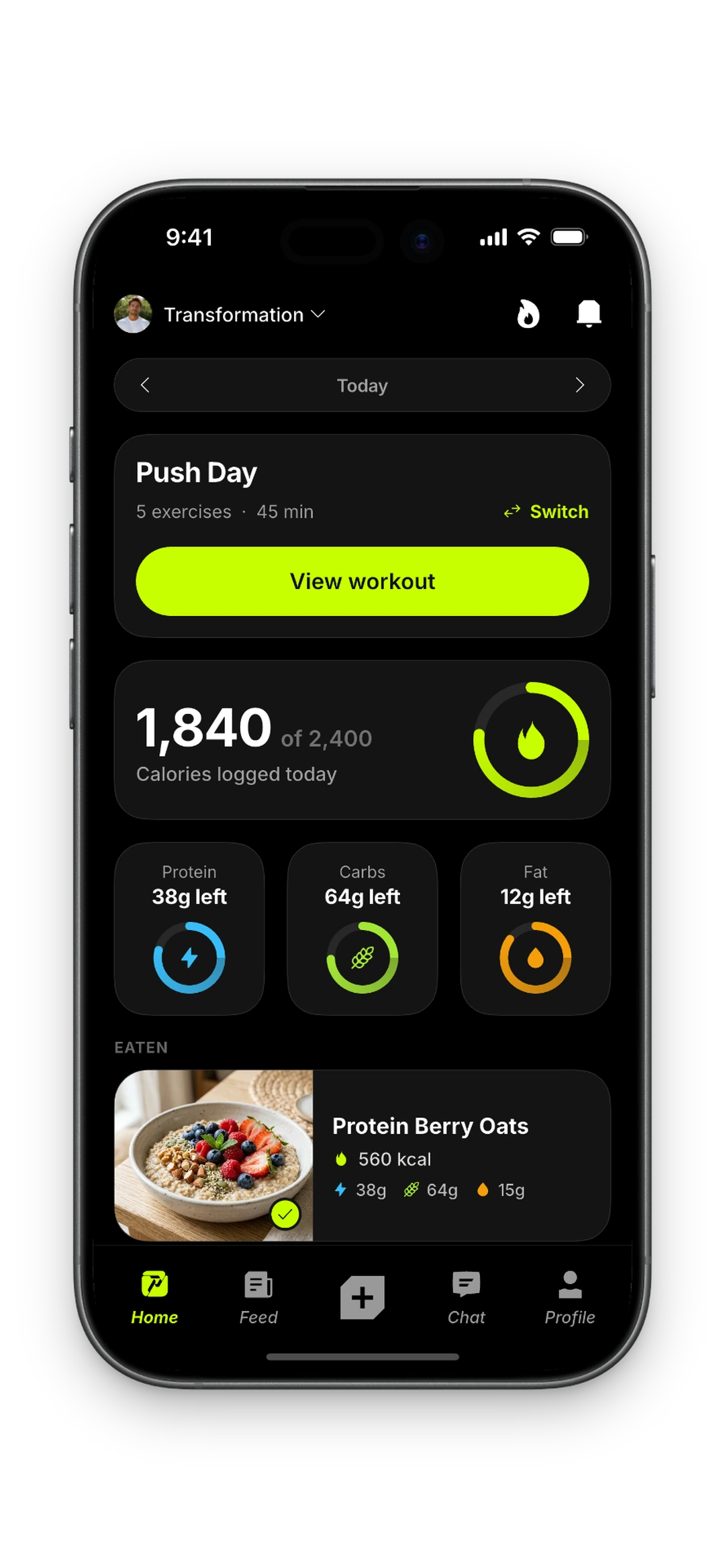
Clients log meals by photo or voice. AI estimates calories and macros against your targets, including training-day and rest-day targets, giving you information to discuss during your nutrition coaching.
Daily habits clients can mark as done
Set water, steps, sleep and custom habits alongside training and nutrition. Clients mark daily habits as done, giving you another part of their routine to discuss in your coaching.
Progress and wearable records in the coaching picture
Review workout logs, personal records, weight, measurements and photos. Connect Apple Health, Health Connect, WHOOP or Fitbit for steps, calories, sleep and heart rate where those records are available.
A connected workspace across your phone and laptop
Use the coach app on iOS or Android and the web dashboard, all in sync. Message clients inside ProCoach as you move between planning, reviewing progress and answering questions.
Choose an online coaching app around the decisions you need to make
Remote coaching depends on what you can learn when you are not in the room. A workout log tells you what was recorded. A check-in answer adds the client's account of the week. Photos and measurements provide other reference points. Before choosing an app, decide which information you need to review and what questions you would ask when those records do not tell the whole story clearly.
ProCoach brings workout logs, personal records, body weight, measurements and photos into one client profile. You can review check-in answers and photos over time, then message the client inside the app. Use those records to prepare a conversation rather than assuming every change needs an immediate adjustment. The purpose of collecting information is to support your judgement about what to discuss and what to change in the plan.
Build a review routine that leaves room for real life
Start with the questions you need answered, then choose a weekly or monthly check-in. ProCoach supports scale, number, text, body weight and progress photo questions. You also choose the check-in day per program, and the client receives a notification that day. A clear routine gives both sides a point of reference for sharing information and looking back at what happened since the previous check-in you reviewed together.
A client may answer after the chosen day. In ProCoach, late answers still count and show when they were sent, so you can read the response with its timing in mind. Reviewing answers and photos over time helps you keep that response in context. Use messages to ask about anything unclear, and agree with clients how check-ins and conversations fit into the remote coaching service you provide.
Use AI for a draft, then apply your coaching judgement
Starting a program can involve turning a short description into a structured plan. ProCoach can use AI to draft a training program and a meal plan for you to edit. Give the draft a proper review against what you know about the client. The useful role of the draft is to give you something to work from while you decide what belongs in the plan you assign.
AI also estimates calories and macros when clients log meals by photo or voice. Those estimates are shown against the targets you set, including training-day and rest-day targets. Keep the distinction between an estimate and the client's experience in mind. A check-in answer or message can add context to a meal log, helping you discuss how the nutrition plan fits their routine and what they are finding difficult.
Give prospective clients a route into your coaching business
Every coach gets a website on sign-up with packages, booking and an application form. Think of this as the place where someone can understand your offering and take a next step. ProCoach also supports sessions and classes with a booking link. For an online PT, this gives your coaching business a website alongside the app clients use once they join through your invite link and begin their plan.
You can take online payments on paid plans through payment requests, packages, program sales and the coach website. Payments go to your own Stripe account, and a processing fee applies. Selected paid plans also support your colours and logo in the client app. A team Space lets several coaches work under one business. See pricing to choose the options that fit how you deliver and charge for your coaching.
Who it's for
Online fitness coaches delivering individual client plans
Bring training, nutrition, check-ins and messages into the same coaching routine. Use each client's profile to prepare your reviews, and move between your phone and laptop as you build plans, read answers and discuss the next steps with clients.
Coaches assigning shared programs to several clients
Assign a training program to one or many clients, with exercises, demo videos, sets and reps laid out in the app. Review each client's logs and check-in answers to understand their experience of the program you have assigned them.
Remote coaching teams working under one business
Use a team Space when your business includes several coaches. ProCoach is available in nine languages, including Arabic. Consider both your team's working routine and the experience clients need when following their plans and communicating with you remotely.
Find your plan
Compare ProCoach plans and choose the right fit for your coaching business
Common questions
01What should an online coaching app let me do from my phone?
Think through your normal coaching day: preparing plans, reviewing client information and answering questions. ProCoach provides coach access on iOS and Android plus a web dashboard, all in sync. That lets you use mobile and web within the same setup. Evaluate the Demo space against your own routine, including the work you prefer to do at a laptop before replying to clients.
02How does an online coaching app help when I never meet clients in person?
It gives you a place to deliver the plan and gather information about how it is going. In ProCoach, clients have training programs with demo videos, nutrition targets, habits, check-ins and messages. You can review logs, answers and progress over time. Those records support your conversations, while your questions help explain what the records alone cannot tell you about the client's experience.
03Can I choose the questions and day for each program's check-in?
Yes. You set weekly or monthly check-in questions using scales, numbers, text, body weight and progress photos. You also pick the check-in day per program. Clients receive a notification on that day. Choose questions that serve a clear purpose in your review, so the answers give you useful information to discuss rather than simply adding more material for clients to submit.
04Will I still be able to use a check-in submitted late?
Yes. Late answers still count in ProCoach and show when they were sent. You can review answers and photos over time, including those late responses. The visible timing helps you understand when the client shared the information. If an answer needs context, use in-app messages to ask about it before deciding what it means for the next part of their plan.
05Can AI create a starting point for training and nutrition plans?
Yes. AI can draft a training program and a meal plan from a short description for you to edit. Review the draft against the client's needs and your coaching approach before assigning the plan. You can also build training programs using the exercise library, with demo videos, sets and reps, and set nutrition targets for training days and rest days yourself.
06How do clients share what they eat without typing out every meal?
Clients can log meals by photo or voice. AI estimates calories and macros against the targets you set, including different targets for training days and rest days. The estimates give you a reference for discussion, while check-in answers and messages can help explain the client's experience. Use both when talking through how the nutrition plan fits into their usual daily routine.
07Can I send the same training program to more than one client?
Yes. ProCoach lets you assign a program to one or many clients. Programs use exercises with demo videos, sets and reps, and repeat by weeks. Sharing a program does not remove the need to understand each client's experience. You can review individual workout logs, progress and check-in answers, then use messages to ask questions about how the assigned training is going.
08Can clients use their wearable data as part of remote coaching?
ProCoach connects with Apple Health and Health Connect, plus WHOOP and Fitbit. Supported information includes steps, calories, sleep and heart rate where available. Consider those records alongside workout logs, habits and check-in answers when reviewing a client. The combination gives you different kinds of information to discuss, while availability determines which wearable records you can use in that client's coaching review.
09How can I sell coaching packages or programs through ProCoach?
ProCoach supports online payments on paid plans through payment requests, packages and selling programs. Your coach website also lets clients pay online on paid plans. Payments go to your own Stripe account, and a processing fee applies. Every coach gets a website with packages, booking and an application form on sign-up. See pricing to review the options for your coaching business.
10What do remote clients need to join, and which languages are available?
Clients join through your invite link and use the ProCoach app on iOS or Android. They do not pay for their app. ProCoach is available in nine languages, including Arabic. When introducing the setup, explain the routine you want clients to follow for workouts, meal logs, habits, check-ins and messages so they understand how the app fits the coaching you provide.
Comparing tools?
Build your remote coaching routine in ProCoach
Explore the Demo space with your next client review in mind. See how programs, check-ins, progress and messages fit your working day, then see pricing for your coaching business.
Get started
Your next step
Explore the plans for your coaching business
Available on mobile